

Building Extension
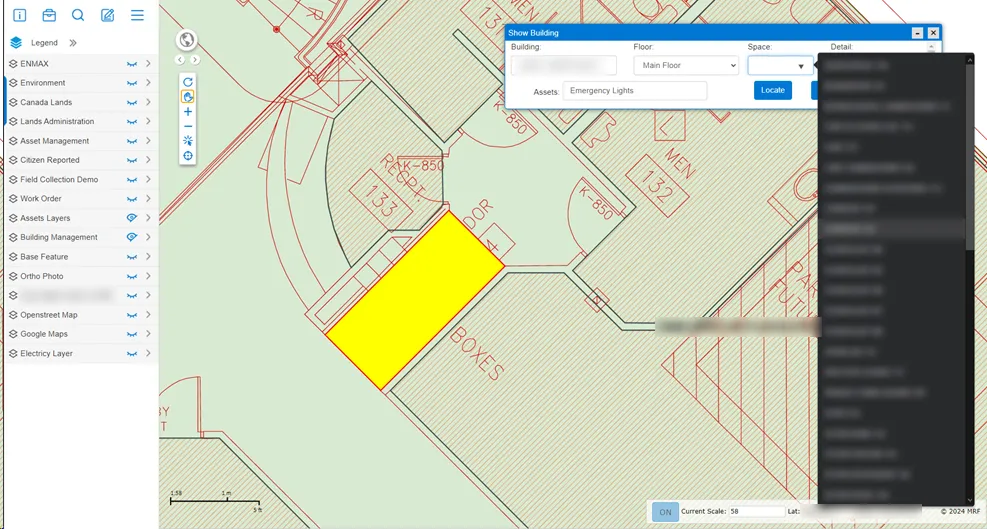
Bring building floor plans into MRF Web Map. Pick a building, floor and room to find it on the plan, and see the assets inside, from emergency lights to equipment, alongside MRF Asset Management.
Municipal buildings hold many of an organization’s assets: offices, meeting rooms, emergency lighting, equipment. The Building Extension brings those buildings into MRF Web Map. Floor plans sit on the map, every room can be found by name, and building assets are tracked room by room.
It works hand in hand with MRF Asset Management, so assets inside buildings are managed the same way as the roads, pipes and facilities outside them.
Above: Pick a building, floor and space, filter by asset type, and locate it on the floor plan.
What you can do with Building Extension
Floor plans on the map
Building floor plans are displayed in MRF Web Map with room-level detail, together with your other layers.
Building, floor, space
Choose a building, a floor and a space (room) from lists, then locate it on the plan in one click.
Assets by building and room
Find building assets, such as emergency lights, by building, floor and room.
Space details
View the details recorded for each space.
Linked with Asset Management
Works with MRF Asset Management, so building assets sit in the same inventory as the rest of your infrastructure.

See it working with your own data.
Book a demo and we’ll walk you through the products that fit your departments, configured for organizations like yours.